Graded Assignment 4:
Shell scripts with and without genAI
Overview and grading
What you’ll practice
In this graded assignment, you will first do the following without genAI: write a shell script to run the program TrimGalore, run it, and interpret its output. Then, you’ll use Claude Code to review and extend your script, to write a loop that runs it for multiple samples, and to summarize the results.
Submission expectations
- Deadline: Sunday Oct 25th at 11:59 pm.
- Submission: Like for GA3, you will submit your assignment by tagging the instructors in an Issue in your GitHub repository, as per the last step below.
As explained in GA3, each of you will have one short oral examination, for one of GA3, GA4, or GA5. If you already had yours for GA3, you won’t have another one. If not, it may be for this assignment, in which case you should also be able to explain any code that genAI wrote for you.
Academic integrity
 |
Use of generative AI tools is permitted, except in Part B (see below). |
 |
Open-book research for the assignment is permitted. |
 |
Getting help on the assignment is not permitted. |
 |
Collaborating, or completing the assignment with others, is not permitted. |
 |
Copying or reusing previous work is not permitted. |
 |
APA Citations and/or formatting for this assignment are not required. |
This is the first assignment in which you are allowed to use generative AI. The general guidelines from now on are:
- You can use genAI as long as you can explain what your code does. If genAI produces commands or constructs not covered in class, do the research needed to understand them.
- Whatever the source, you remain responsible for whether the code is correct.
That said, this assignment has two exceptions to these guidelines:
- You must do Part B without genAI assistance (same rules as GA1–GA3). This is because in Part C, you’ll compare genAI output with a script and answers you produced yourself.
- In Part C, genAI use is not just allowed but required: you must use Claude Code specifically (not another genAI tool), and document how you used it (item 17).
Rubric
You can earn a maximum of 0.5 points for each of the 20 numbered questions/items below (you’ll get 0.25 points for partially correct answers, and 0 points for missing or incorrect answers).
Detailed steps
General
Like before, we provide a template
README.md(see “Setting up” below) with a section for each question, where you can add your answers:- Add the commands you ran only where the template has a
bashcode block for them. - Include a command’s output only where the template has an output block for it.
- Add the commands you ran only where the template has a
For any shell script you write, follow the practices from class: start with the shebang and safe-settings lines, followed by a comment block with the script’s purpose and a usage line (as introduced in w9a), and copy any placeholder variables like
$1to descriptively named variables.Commit your files to your Git repo as you go along, using informative commit messages. Besides the specific commits that questions ask for, commit at least once per Part.
Setting up
Start a VS Code session at OSC OnDemand as per usual, and open a terminal in that session.
Create a new dir for this assignment,
/fs/ess/PAS3493/people/$USER/GA4. Then, open this dir as your VS Code folder withFile>Open Folder. This will be your working dir for the entire assignment, and Claude’s workspace in Part C.Copy the template file for this assignment,
/fs/ess/PAS3493/share/GA4/GA4_template.md, into your working dir asREADME.md. You’ll use this file throughout the assignment to add your answers.
Part A: Your project dir and Git repo
Inside dir
GA4, create subdirsscriptsandresults/fastqc. Then:Copy the
CLAUDE.mdfile you created in class into your working dir (Claude will use this in Part C).Copy a FastQC report from week 7 (you’ll compare this to a later FastQC report in Part B):
cp ../week07/results/fastqc/S63_R1_fastqc.html results/fastqc/
Help! I don’t have one or both of the files.
You can copy the
CLAUDE.mdfile from the share dir like so:cp /fs/ess/PAS3493/share/GA4/CLAUDE.md .And the FastQC report from the share dir like so:
cp /fs/ess/PAS3493/share/GA3/results/fastqc/S63_R1_fastqc.html results/fastqc/Initialize a Git repository, and create a
.gitignorefile that makes Git ignore theresultsdir. Then, commit yourREADME.md,CLAUDE.md, and.gitignorefiles.
Part B: A TrimGalore script — without genAI
TrimGalore (Krueger 2026) is a commonly used tool to preprocess the reads in FASTQ files before further analysis. It’s the next step in the RNA-seq analysis workflow we’re gradually applying to the Garrigós et al. (2025) data in this course:
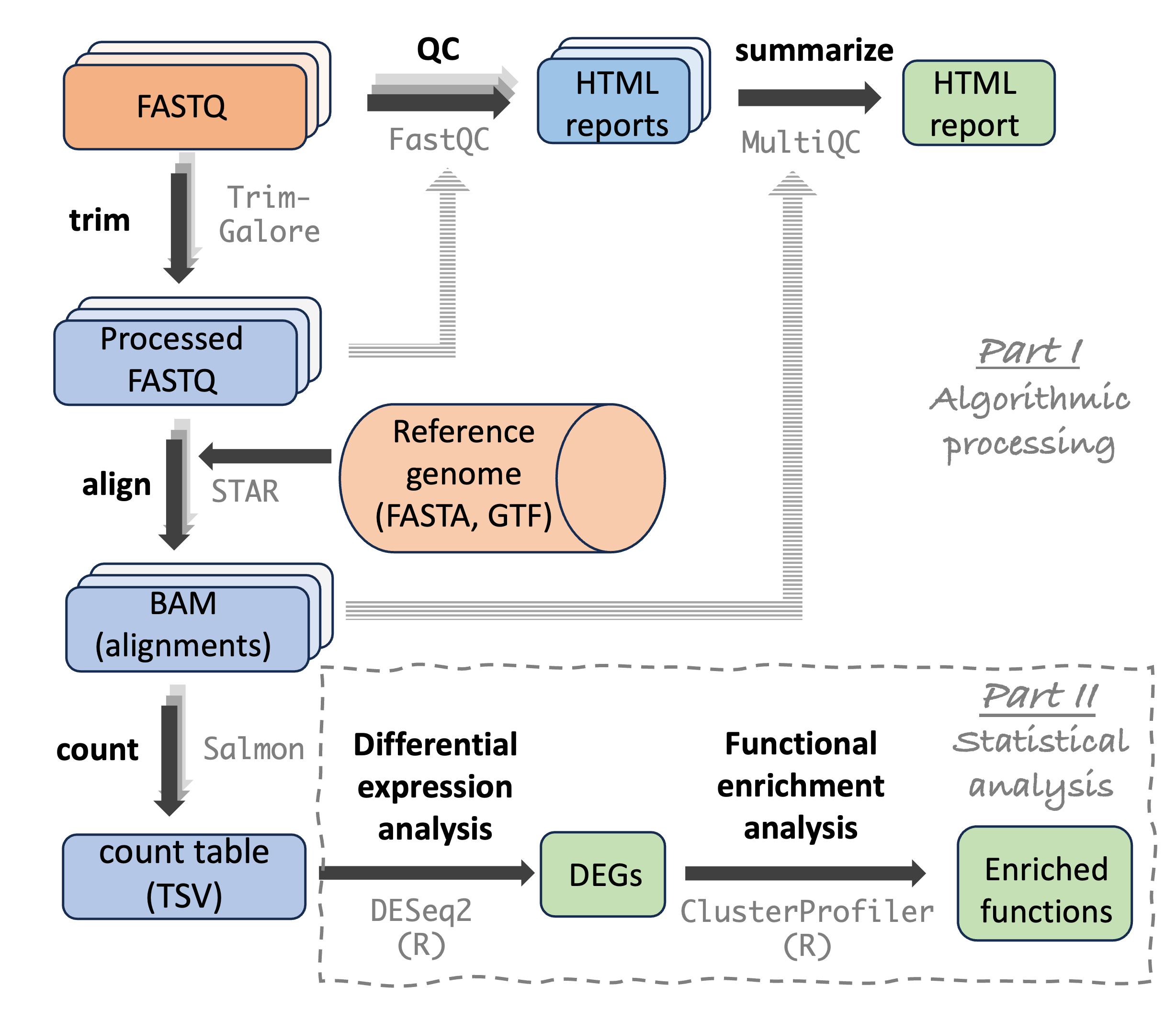
TrimGalore takes FASTQ files as input, and outputs filtered FASTQ files, along the way removing:
- Any adapter sequences that are present in the reads1
- Poor-quality bases at the end of the reads
- Reads that have become very short after the prior two steps
Unlike FastQC, TrimGalore isn’t run on one FASTQ file at a time: when you have paired-end reads, like we do with the Garrigós et al. (2025) data, a single TrimGalore run should include both the R1 (forward read) and R2 (reverse read) file for one sample. This is because R1 and R2 files should remain “synced”: generally, you can’t remove a read from an R1 file without also removing its mate from the R2 file.
Several largely equivalent tools exist for this kind of FASTQ preprocessing — Trimmomatic and fastp are two other commonly used ones. TrimGalore started out as a “wrapper” around yet another tool called Cutadapt, but since version 2 (which we’re using), it is a standalone program. Two advantages of TrimGalore are:
- It will auto-detect the adapters that are present in your reads.
- It can automatically run FastQC on the trimmed sequences.
Get a link from the Seqera Containers website to a container with TrimGalore version 2.3.0 (note: the package is called
trim-galore). Then, print TrimGalore’s help info by runningtrim_galore --helpwith your container link. Use this help info to find the TrimGalore options to:- Tell it that your reads are paired-end2
- Set the output dir
- Make it run FastQC on the trimmed FASTQ files
Also use the help info to find the default thresholds for A) the base quality score and B) the read length, and report what they are. (You don’t have to change these thresholds, the defaults work fine for us.)
Write a shell script
scripts/trimgalore.shthat runs TrimGalore on the R1 and R2 FASTQ files of one sample:- The script should accept three arguments: the R1 FASTQ file, the R2 FASTQ file, and the output dir.
- Use the three options from question 3.
- Include “logging statements” with
echo, like in the FastQC script from class. (You don’t need to separately print the TrimGalore version, since it is printed automatically when you run the program.)
WarningStick to using the default setting for the number of cores, for now. (Click to expand)Since you’re running the program interactively on your single-core VS Code compute job, you only have 1 core at your disposal. Using 1 core is TrimGalore’s default, so don’t adjust this setting here with TrimGalore’s
--coresoption. Next week, you’ll learn to submit scripts as batch jobs, which gives you the opportunity to use multiple cores to speed things up.Run your script for the FASTQ files of sample
S63(in../garrigos/fastq), withresults/trimgaloreas the output dir. Then, list the files in the output dir, and briefly describe what each type of output file contains. Once your script works, commit it. (If it failed, try to fix your script, and briefly describe the problem and your fix in the README.)TrimGalore printed quite a bit of logging output to the screen, while additional information is saved in the
*_trimming_report.txtoutput files. Use this information to answer the following:- Which adapter sequence did TrimGalore look for in the reads, and how did it decide on this (you didn’t tell it which adapter to look for)?
- In each file (R1 and R2), in what percentage of reads were adapters detected?
- In each file, were more bases removed as a result of quality trimming or adapter trimming?
- What percentage of read pairs were removed altogether?
TrimGalore also reports on poly-G trimming. Newer Illumina sequencers, such as the NextSeq and NovaSeq, use a “two-color” chemistry in which
Gbases produce no signal. As a result, when the signal is lost near the end of a read, the sequencer calls a stretch of falseGs, which should be trimmed off. Use TrimGalore’s logging output and the trimming reports to answer the following:- Did TrimGalore do poly-G trimming, and did you have to tell it to?
- What does TrimGalore conclude about the sequencing technology that was used to generate these reads?
- Was more poly-G trimming done in the R1 or the R2 file? (Optional: any idea why?)
Compare TrimGalore’s FastQC report for the trimmed R1 file with the FastQC report for the raw R1 file of the same sample (the one you copied to
results/fastqc).- Name at least two differences between the reports. Do things look better now in terms of pass/warn/fail status?
- Do the short reads with only
Ns, which you saw in week 4, appear to have been removed? If so, was that due to the length threshold, or something else? - Name something you didn’t expect or are confused about.
To see the two files side by side, download one or both (Click to expand)
The HTML preview in VS Code won’t let you preview each file in a separate tab. So, to view them side by side, you can download one or both of the FastQC reports: in the file explorer, right-click on a file and click “Download…”. Then, open the downloaded file(s) in your browser.
Part C: Bring in genAI
Now that you have a script that you wrote yourself and that you know works, you’ll use Claude Code to review and extend it. Some general guidelines:
- Use the Claude extension in VS Code, with:
- The permission mode set to Manual throughout
- The default model and effort level (Sonnet 5 Medium), except where a question explicitly asks you to change them
- Start a new conversation for each question, to keep the context window small (and to save costs).
- For questions 10, 11, 13, and 14, export the conversation when you’re done with it, using the
/exportcommand as shown in class. Save it in a dirdoc/aiin your working dir, with a file name that includes the question number, likeq10_review-sonnet.txt. (These are the conversations that produced code you kept, or that informed your decisions. For the other questions, your notes in the README are enough.) - For each question, record in your README what you asked, what you got, and what you concluded after checking it.
- In this specific case, you are graded on your evaluation of Claude’s output, not on whether Claude happened to give a good answer. A well-documented case in which you caught Claude being wrong is worth full points.
With your
scripts/trimgalore.shopen in the editor, and the Claude panel open, check that the script is added as context (you should see its name below the prompt box). Then, using the default model and effort level (Sonnet 5 Medium), ask Claude to review your script, for example:Review this shell script. List the 5 most important problems or improvements, most important first, with a one-sentence reason for each. Don’t change it yet.
In your README, briefly list Claude’s suggestions, and for each, say whether and why you agree with it, disagree with it, or don’t understand it. Did it suggest anything that you think is wrong, or that conflicts with how we’ve been writing scripts in this course? Did it refer to any of the conventions in your
CLAUDE.md?Finally, type
/usagein the prompt box, and add the estimated cost of this conversation to your README.Some hints about possible feedback (Click to expand)
- If you use “# Copy the placeholder variables” as a comment, Claude is likely to comment on that, calling it confusing or inaccurate. This is technically fair, but rather nitpicky, and you can ignore it.
Now, get a second review from an even more capable model. Start a new conversation, so that this model doesn’t see the first review. Then, switch the model to Opus 5.5 with effort level High. Give it the exact same prompt as in the previous question. If Opus asks permission to run a command that only prints information, such as TrimGalore’s help info, you can allow it. When it’s done, type
/usageagain, and add the estimated cost of this conversation to your README.You don’t need to evaluate each of Opus’s suggestions separately. Instead, compare the two reviews:
- Which suggestions did only one of the two models make?
- Did either model claim something that you know is wrong, for example based on your successful run in question 6?
- Did either model check its claims, for example by running commands?
- Did Opus’s review change your mind about any of your answers to question 10?
- How did the costs of the two reviews compare?
- Which review would you trust more, and why? Was the difference worth the difference in cost?
The output of genAI models varies between runs, so there is no single “correct” outcome of this comparison. When you’re done, switch back to Sonnet 5 Medium for the remaining questions.
Both reviews probably suggested checking that the input FASTQ files exist (if not, you’ll make this change anyway in the next question). Before making any changes, run your script with an R1 FASTQ file path that doesn’t exist. What happens, and at which point does the script stop?
Now, ask Claude to implement this suggestion, for example:
In scripts/trimgalore.sh, add a check that both input FASTQ files exist, and exit with an informative error message if they don’t.
Claude will show you the proposed change as a diff: read it before you accept it.
It may also ask permission to create a diary file, as per your
CLAUDE.md: if so, allow that too.Then, test the updated script with the same non-existent file name as in the previous question. Does it behave the way Claude claimed it would? And given what you saw before the change, how useful is this check?
Finally, commit the updated script. Your Git history now shows exactly what Claude changed in your script.
Ask Claude to write a
forloop that runs your script for multiple samples, for example:Write a for loop that runs scripts/trimgalore.sh for the 7 samples whose IDs start with S6, with output dir results/trimgalore. I will run the loop from the GA4 dir. Only show me the loop: don’t add it to a file, and don’t run it.
Add the loop to your README, but don’t run it yet (you will do so in the next question). Review the w7b self-study section, and think about whether this loop will:
- Run the script once per sample, rather than once per FASTQ file?
- Get the correct R2 file for each R1 file? If you don’t understand how it does this, ask Claude to explain that part.
- Only run for the 7 samples whose IDs start with
S6(S63toS69)?
If you ended up changing the loop because of concerns with the above points, explain what you changed and why.
Test the loop by putting
echobefore thebashcommand, so that it only prints the commands it would run. If those look right, remove theechoand run the loop for real (this will take about 2 minutes). If you get any errors, fix them with help from Claude. When it’s done, check the output files inresults/trimgalore: are all 7 samples represented?Ask Claude for a command that summarizes your TrimGalore results: for each sample, the percentage of read pairs that were removed. For example:
Give me a simple command that prints, for each sample, the percentage of read pairs that TrimGalore removed, based on the output files in results/trimgalore. I’m a shell beginner, so only use basic commands like
grep,cut, andforloops.Run the command, and verify its output:
- If the output doesn’t look right, ask Claude to explain how it works and/or to fix it.
- Does the value for
S63match your answer to question 7? - In your own words, how does the command work? If it uses anything we didn’t cover in class, ask Claude to explain it.
Document your genAI use: check that your
doc/aidir contains the exported conversations for questions 10, 11, 13, and 14. If you forgot one, reopen that conversation from Claude’s list of past conversations, and export it then. Then, commit thedoc/aidir to your Git repo.Based on your experiences in this part, add one or more instructions to your
CLAUDE.mdthat would have improved Claude’s output (for example, to prevent a suggestion you disagreed with in question 10 or 11). If you really can’t think of anything along these lines, you can instead add an instruction that you simply think would be interesting to try. Then, start a new conversation and test whether Claude follows the new instruction. In your README, describe what you added and what happened, and commit your updatedCLAUDE.md.Write a short reflection in your README (one or two paragraphs) about your experience with Claude in this assignment. Any thoughtful reflection will earn full points, but here are some example questions you can answer if you like:
- What did you find most helpful about using Claude?
- What challenges did you encounter?
- Did Claude tell you anything that turned out to be wrong, and how did you find out?
- Were its explanations clear, or did you have to do additional research to understand them?
Part D: Publish your repo on GitHub
Finally, you’ll publish your Git repo on GitHub and submit your assignment by creating an Issue.
Make sure you have committed your final
README.md. Then, create a new, empty, public repository on GitHub (e.g., named “GA4” or “PLNTPTH5006-GA4”), connect it to your local repo, and push your local repo to GitHub.On the GitHub page for your repo, create a new Issue. Use whatever title you like, and in the text box (not the title), tag the instructors: GitHub users
kstarr791andjelmerp(using the@notation like@kstarr791), asking them to take a look at your assignment.